Scugdale

Went to Scugdale on sunday. The weather was meant to be lovely and sunny (at least according to the mid-week forcast) but it turned out to be misty and windy, and a little bit cold.

Did a bit of bouldering to start with, some easy Diff problems on the east end (Beginners Wall Area) and then met up with Ian, a VERY nice guy we met at Sunderland Wall who is being very kind by showing us the ropes (pun intended) a bit more to help us gain in confidence.

He apologised for the weather (it wasn’t his fault!) and then helped set up a top rope and Caroline and I both did Pet’s Corner (VS 4b) and Wailing Wall (VS 4c) – very impressed with ourselves we where.

In general though I think it needs a rematch – the rock was very dirty (due to lots of snow in previous weeks) and sandy, and still quite damp (it wasn’t a warm wind!).

Took my camera but completely forgot to take any photos. Annoyed.

Users of the Flickr.Net API

We’ve just had a few people release software which uses the Flickr.Net API Library – hurray!

If you have an application that uses the Flickr.Net API Library let me know and I’ll list it here. Need help with testing, need a new feature or any other feedback then let me know.

Flickr Papr

mikecpeck‘s application Flickr Papr that creates wallpaper collages of images on Flickr is live again.

Find it here: http://flickrdotnet.wdevs.com/flickrpapr.

Clipr

Want to copy stuff from your windows clipboard straight to Flickr. Look no further that stevex‘s Clipr application.

Find it here: http://www.stevex.org/clipr
Discuss it here: http://flickr.com/groups/topic/20030/

FlickrDesktop

Regularaly change your dekstop wallpaper to an image from Flickr using this .Net application. Unfortunately it currently requires the .Net Framework 2.0 beta – although a 1.1 version is in the pipeline.

Download and Discuss: http://flickr.com/groups/topic/20008/

Glimmr

Update: Glimmr is a simple Flickr Uploader for the GNOME desktop. It uses the Flickr.Net together with Mono/C#! Amazing!

Download: http://glimmr.sourceforge.net/

Praktica camera for £20

Intro

I bought a camera from Dixons for £20 the other day, just because I thought it might be fun to have a cheap and nasty camera that I could keep in my jacket and never again would I have to think ‘damn, wish I had my camera with me’.
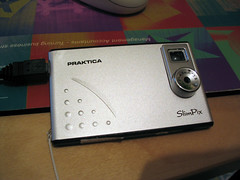
Praktica Slimpix Camera

Features

Its about the same size as a credit card (width and height) and about half a centimetre thick. i.e. pretty damn small. My first thought was ‘cool, just what I wanted’.

The software that is supplied is very rudimetary, and unfortunately is custom software and not just your usual ‘appear as hard drive’ type device which is ashame.

The camera takes 640×480 and 320×240 sized pictures, at two different quality settings (much like jpeg quality settings I guess.) It holds 26 photos at 640×480 at the highest quality – all of the photos on this page are taken at that setting. At the lowest setting it will hold over 100 photos I believe.

The first couple of times I used it I kept losing photos. I’m fairly sure the reason for this is because I hadn’t fully charged the camera (charges while plugged into the computer via USB). After I fully charged the camera I haven’t had any problems.
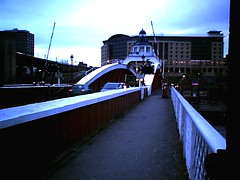
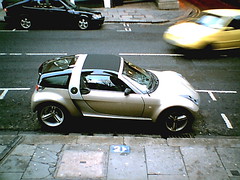
Swing bridge again Weird Car

Image Quality

It is fairly demanding of light – and often refuses to take photos if there isn’t enough light. Cloudy days appear as very dark images and there’s not much you can do to retrieve any detail. The look of the pictures has a very grainy feel to it, which seems to give the pictures a definate ‘look’ – which if you’re ok with is fine. We’re not going to get brilliant pictures out of £20 after all.
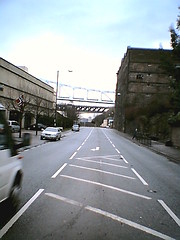
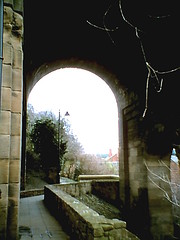
In the line of fire Under the bridge

It is also quite sensitive about movement. Holding the camera still is very important. I’m guessing its shutter speed is not too fast, and hence pictures can blur quite a bit – again the more light the better for this as well. It also seems to blank out sky, or areas where there are a lot of light in some photos.

Conclusion

For £20 I think its quite good, once you’ve charged it up and remember to stay very still and only take photos of things in the light. Initially I wasn’t very happy – but after taking more photos I think I’m quite enjoying the experience.

Flickr Screensaver 3.2

Finally – a new version.

My web hosting has been down for a while so I haven’t been bale to post for while.

New Feature:

Authorization: enter your email address and password to give access to private groups and images.
Contacts: display the last 50 (API limit I’m afraid) photos from your contact.
Description: display the title and user at the bottom of the screen for each image.

Fix:
It shoudn’t crash when my web server goes down in the future (if anyone has been having that problem I apologise).

[Download File](/flickr/flickr-screensaver)